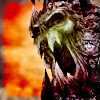
Bosses Aura

1 pages Page 1
Ashleigh McMahon
Ashleigh McMahon
Site Contributor
#1
Hello.

I think it might just be me, but I can't seem to spot a bosses " aura colour".

I don't know if it's me, my computer or for some reason I just cant see it.


Can someone please post a picture off a boss and spot out the aura for it for me please?

I looked very close at boss monsters ingame and cant seem to see an aura.

Thanks Alot.

Regards, Ashleigh.

d
dansamy
Chasing Dragons
#2
Video Card (and/or its drivers)
Ashleigh McMahon
Ashleigh McMahon
Site Contributor
#3
I definitaly don't see that.


It must be my graphics card, right?

Thanks.

Regards, Ashleigh.
M
MaglorD
Jungle Guide
#4
I wish my character could have an aura like a boss monster
Undead Prince Rurik looked cooler with the warrior(yellow) aura than when he didn't have it.
MCS
MCS
Banned
#5
Lol I never even knew they had these.

My computer clearly owns. I always just knew they were a boss by their name and the class by their skills -_-.
Lalii
Lalii
Academy Page
#6
Quote:
Originally Posted by MaglorD
I wish my character could have an aura like a boss monster
Undead Prince Rurik looked cooler with the warrior(yellow) aura than when he didn't have it.

:Sigh: Spoilers...
RTSFirebat
RTSFirebat
The Humanoid Typhoon
#7
Quote:
Originally Posted by MaglorD
I wish my character could have an aura like a boss monster
Undead Prince Rurik looked cooler with the warrior(yellow) aura than when he didn't have it.
Thank for the spolier stupid
d
dansamy
Chasing Dragons
#8
News flash, folks. If you are browsing public forums, you are running the risk of inadvertently reading/seeing spoilers. Don't want the plot spoiled? Then don't read forums until you have at least one character through all the missions. Not everyone on a public forum has sense enough to use *Spoiler Alert*.
deathwearer
deathwearer
Krytan Explorer
#9
Quote:
Originally Posted by MCS

My computer clearly owns. I always just knew they were a boss by their name and the class by their skills -_-.
if you can't make the aura work... do like him... you can see it also by the kind of monster it is.
Kha
Kha
Sins FTW!
#10
Quote:
Originally Posted by deathwearer
if you can't make the aura work... do like him... you can see it also by the kind of monster it is.
Yeah, considering they have made mistakes in the past with giving bosses the wrong aura color. Really was disappointing when farming elites.
deathwearer
deathwearer
Krytan Explorer
#11
hehe pretty anoying " hey that boss is suposed to be a warrior but hes casting shit on me" :P
M
Mimu
Lion's Arch Merchant
#12
Quote:
Originally Posted by dansamy
News flash, folks. If you are browsing public forums, you are running the risk of inadvertently reading/seeing spoilers. Don't want the plot spoiled? Then don't read forums until you have at least one character through all the missions. Not everyone on a public forum has sense enough to use *Spoiler Alert*.
But you would think that reading a topic like "Boss aura's don't show up" would be spoiler-free..

I wish people would just keep all spoilers in the quest forum.


I can't actually see the boss aura's either, but my computer is basically a pile of crap. (Luckily I am upgrading it at some point this week. )

I would guess it is a video card/drivers issue..
deathwearer
deathwearer
Krytan Explorer
#13
for the people that doens't see the aura, what's your video card? and drivers ( are you using 3rd party drivers? )
s
silvertemplar
Lion's Arch Merchant
#14
On my laptop using the "unsupported" Intel Extreme graphics, i do not see any auras, never knew there were any. On my desktop with my Nvidia GF5200 there are auras quite clearly, can even spot it from far away.

Sadly, my "supported" desktop crashes and freezes up like crazy, but my laptop runs just fine. Oh the irony.
S
Syno
Academy Page
#15
Quote:
Originally Posted by silvertemplar
On my laptop using the "unsupported" Intel Extreme graphics, i do not see any auras, never knew there were any. On my desktop with my Nvidia GF5200 there are auras quite clearly, can even spot it from far away.

Sadly, my "supported" desktop crashes and freezes up like crazy, but my laptop runs just fine. Oh the irony.
You should try updating your drivers. I had the same problem with mine, and I updated to an "Unsigned for Windows XP" driver, the newest one, and mine stopped crashing. Also try turning anti-aliasing off!


A free web-based wargame that you can play from anywhere!
M
Mimu
Lion's Arch Merchant
#16
Quote:
Originally Posted by deathwearer
for the people that doens't see the aura, what's your video card? and drivers ( are you using 3rd party drivers? )

Quote:
Originally Posted by silvertemplar
the "unsupported" Intel Extreme graphics
I use that.

But I am upgrading it either today or tomorrow, so hopefully this problem will go away.

Edit:
Quote:
Originally Posted by Syno
A free web-based wargame that you can play from anywhere!
And why do you keep posting that referral link? If there isn't a rule against it on this forum, there should be..
Myodato
Myodato
Lion's Arch Merchant
#17
Wow, so that's what auras look like !

Tbh though, I think they look kinda stupid, so I don't think I'll be doing any 'fixing' anytime soon.
Ashleigh McMahon
Ashleigh McMahon
Site Contributor
#18
I now have Nvidia gforce 5500 graphics card.

I now see the aura fine.

Thanks for the replys.

Regards, Ashleigh.